How to Run a Player Auction
The auction is the best night of the season and it has nothing to do with cricket. Captains hunched over a purse, a bidding war over a bowler nobody rated last year, someone going unsold and being picked up for base price in the second round. Every tournament wants one. Most end up running it on a whiteboard with a calculator and an argument.
Skipper runs it properly. Captains bid from their own phones, the purse maths is enforced rather than trusted, every bid is on a feed nobody can argue with afterwards, and the whole thing can go up on a projector or out to YouTube. This guide walks through it from setup to the final CSV.
Setting Up the Auction
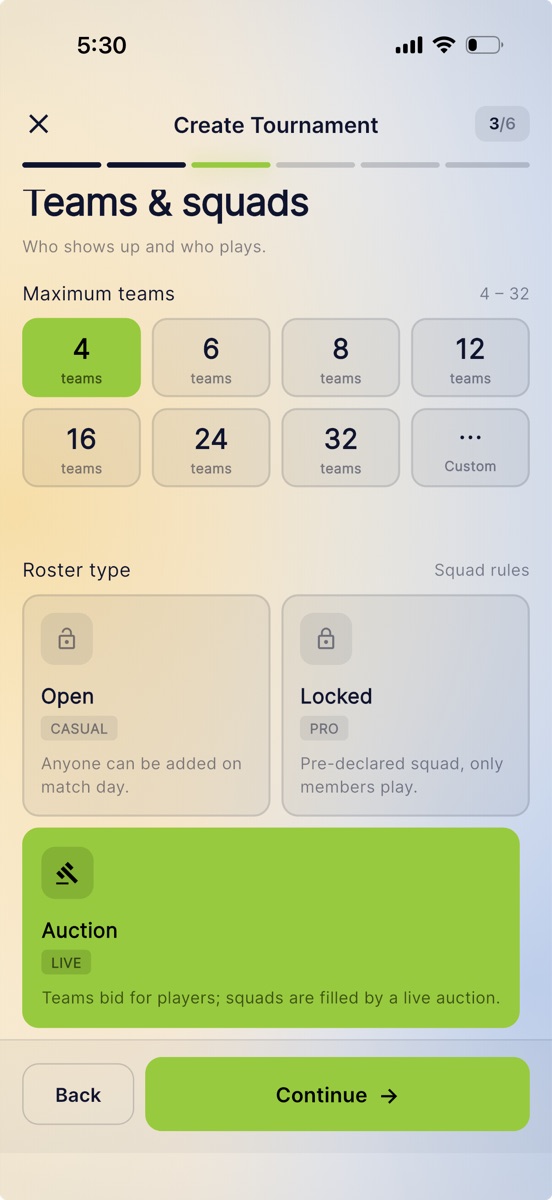
An auction lives inside a tournament. You can add one to a tournament you already have, or pick it while creating a new one: on the Teams & squads step, the roster type offers Open, Locked, and Auction. Choose Auction and the tournament is set up for one from the start.
The auction itself has its own home, with tabs across the top: Home, Players, Pools, Team, Economics, and Broadcast. The header carries the four numbers you will keep glancing at: purse, minimum bid, timer, and squad size.
Under Economics you set the money:
- Team purses. Every team is listed with its purse, and each one is editable on its own, so a side joining late on a smaller budget is a two-tap change rather than a compromise.
- Bid increments. A flat step to begin with, say ₹1,000 on every raise. You can then add ranges that change the step once a bid count or a price is reached, and a raise uses the last range whose floor has been met. This is what stops a marquee player crawling up in thousand rupee jumps for twenty minutes.
- Bid timer. The going, going, gone countdown for each player, with presets from ten seconds to a minute, or a number of your own. Read the next line carefully, because it surprises people: it is a display timer. Bidding stays open after it reaches zero, and the auctioneer sells manually. The clock builds the tension; it does not end the lot.
- Squad size. The minimum and maximum number of players a team must end up with. This matters more than it looks, as the section on purse maths explains.
Building the Player Pool
Players live on the Players tab, and there are two ways they get there.
Let them register themselves. Open registration and the tournament home carries a "Player auction is open, register to go under the hammer" card with a Register button. Entries arrive under Registrations, where you approve or reject each one. This is the low-effort path when you have sixty players and no interest in typing sixty names.
Add them yourself. The auctioneer can add players directly: search for an existing Skipper player, pull someone from your phone contacts, or scan their player QR. Guests are allowed, so a player with only a phone number, or only a name, can still go under the hammer. You can add a photo for a guest too, cropped in the app, so the big screen is not showing a grey circle when they come up.
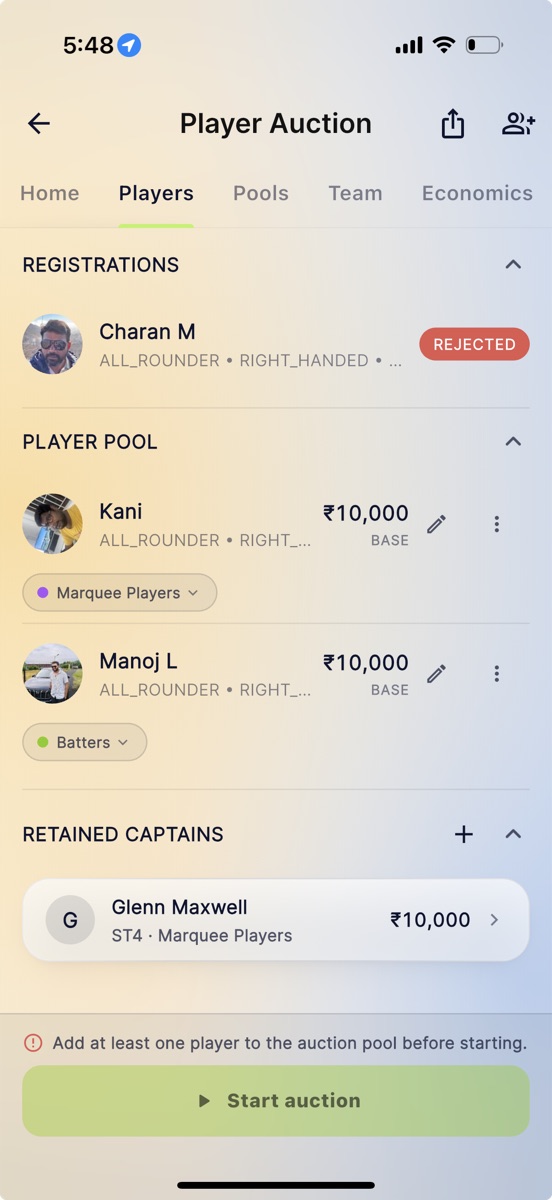
Everyone approved sits in the Player pool with a base price you can edit, and a chip showing which pool they belong to.
Retained Captains
Most local leagues do not start from a blank slate. A team has a captain already, and pretending otherwise wastes the first twenty minutes of the evening.
So the Players tab has a Retained captains section. Assign a player to a team at a set price before the auction starts, and that amount comes out of the team's purse straight away. They never go under the hammer, and the money is already accounted for when the bidding begins.
Pools: Marquee, Batters, Bowlers
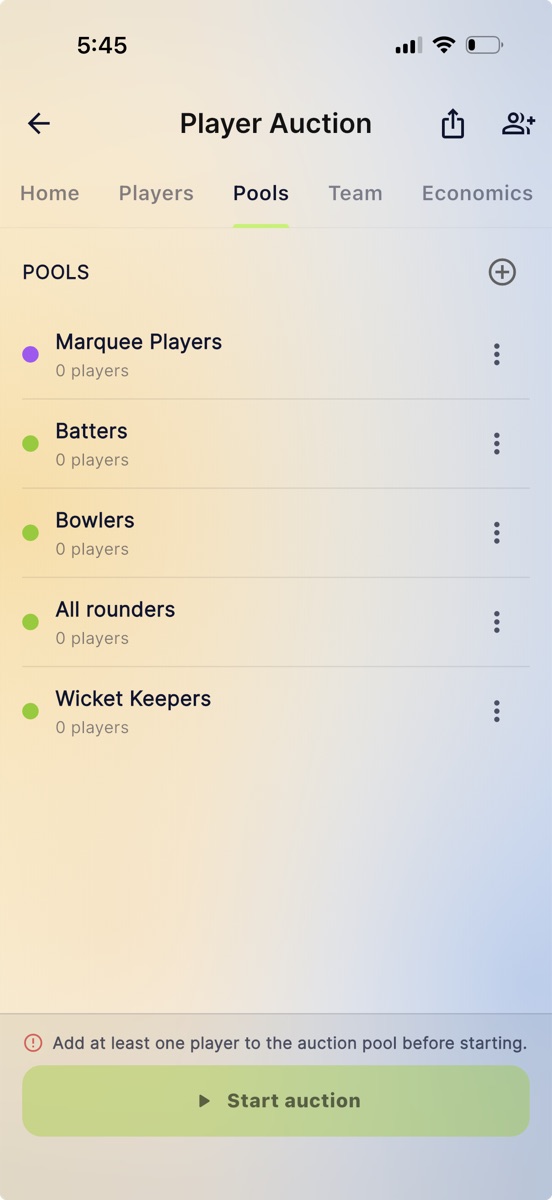
Eighty players in one long list makes for a shapeless evening. Pools fix that. On the Pools tab, group the players into categories that are auctioned as a block, the usual ones being Marquee Players, Batters, Bowlers, All rounders, and Wicket Keepers.
Each pool gets:
- A bid range, a minimum and a maximum, so a marquee pool starts high and a squad-filler pool cannot run away with someone's purse.
- Players per team, a minimum and a maximum. This is how you make every side buy at least two wicketkeepers, or stop one team hoarding every seamer.
- A colour, which is how you tell at a glance on the big screen which block you are in.
The per-team minimums are not decoration. They feed the bid cap described below, so set them to what you actually intend to enforce.
Charging a Registration Fee
Optional, and off by default. If your auction has an entry fee, you can collect it inside Skipper. Skipper collects the money and pays it out to your bank account after a one-time verification. Skipper charges 5% plus GST, and the player pays it on top of your entry fee, so your fee reaches you whole. There is a Settlements screen showing every payout as a line you can tick off against your bank statement.
One behaviour worth knowing: if you have set a fee and payments cannot be reached for any reason, registration is refused with a clear message rather than quietly letting people in for free. If you want a free auction, set the fee to zero rather than leaving it unconfigured.
Starting, and What It Commits You To
Tap Start auction and Skipper checks your homework before it lets you through. It closes registration, permanently, and puts the first player on the block. You can pause the auction afterwards, but registration cannot reopen.
If the numbers do not add up, it says so rather than letting you find out at eleven at night: "Only 3 players available for 4 teams needing 11 each (44 total). Some teams may not fill their minimum squad." You can start anyway, but at least you are choosing to.
Auction Night
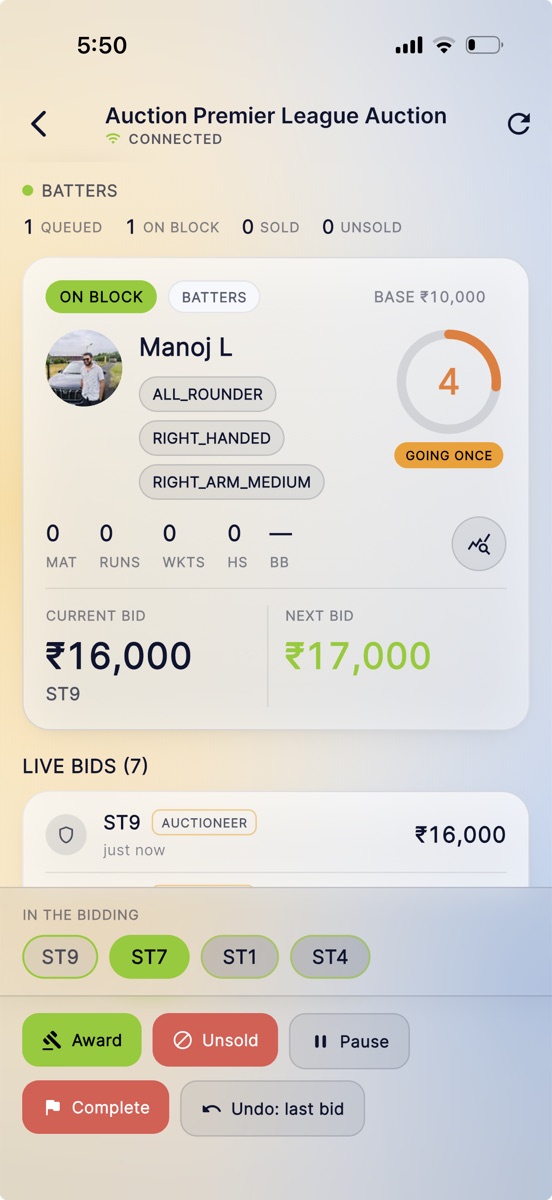
The room is the main screen. Across the top sits the running count of the current pool, queued, on block, sold, and unsold. The player on the block fills the card below: photograph, role and batting or bowling style, career numbers, base price, and the countdown ring turning in the corner. As the clock runs down the ring picks up a Going once badge, then goes on turning, because the sale is yours to call.
Under the card, the two numbers that matter: the current bid with the team holding it, and the next bid a team would have to make. Below that the live bids feed, newest first, and a row of team chips under In the bidding, with the leading side picked out in lime.
Bidding works two ways, and you can mix them. Team representatives bid from their own phones, which means the owner, an admin, or the captain of an accepted team. Or the auctioneer runs the room in the traditional way, calling for bids out loud and tapping them in, in which case the feed marks each one as coming from the auctioneer.
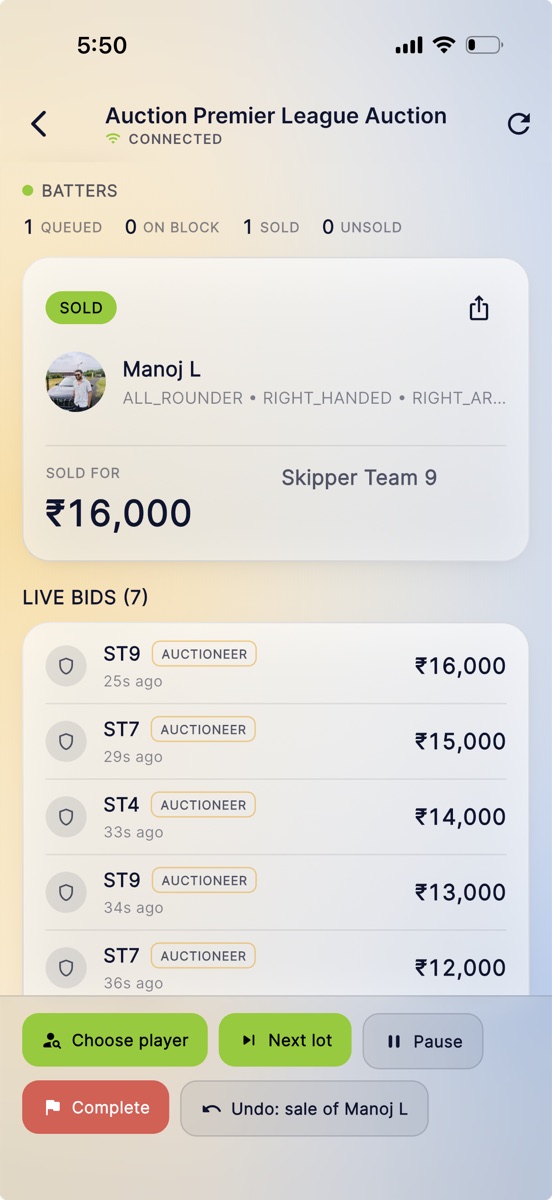
The action bar carries the controls: Award to the leading team, mark a player Unsold, Pause, Complete the auction, and an undo that always names what it is about to reverse, whether that is Undo: last bid or Undo: sale of Manoj L. Once a lot closes, the same bar offers Choose player to pick the next one deliberately, or Next lot to carry on in order.
Awarding asks you to confirm in plain words, naming the team and the amount, so a mis-tap on the wrong chip does not sell your best batter to the wrong side.
When the hammer falls, the card flips to a Sold panel with the price and the buying team, and a share button right on it for the player who wants to post what they went for.
The Purse Maths, Enforced
This is the part a whiteboard always gets wrong. A team with two crore left and eight slots to fill cannot spend two crore on one player, because it then cannot field a legal squad.
Skipper works this out for you. The highest bid a team is allowed is its purse minus the cheapest legal way of filling its remaining slots, including any per-pool minimums it still owes and any per-pool maximums it has already hit. The auctioneer sees that ceiling per team.
When a team cannot bid, tapping its chip tells you exactly why, with the number: "CSK can bid up to ₹8,500. Beyond that it could not complete its minimum squad." Tapping the team that is already leading says so, rather than doing nothing and leaving you wondering whether the tap registered. No more mid-auction arguments about whether a bid was legal.
Putting It on the Big Screen
An auction deserves an audience. Skipper has a broadcast view built for exactly that: the player on the block, a high-bid ticker, the team purse table, a sold card with confetti when the hammer falls, and a tidy idle card between lots.
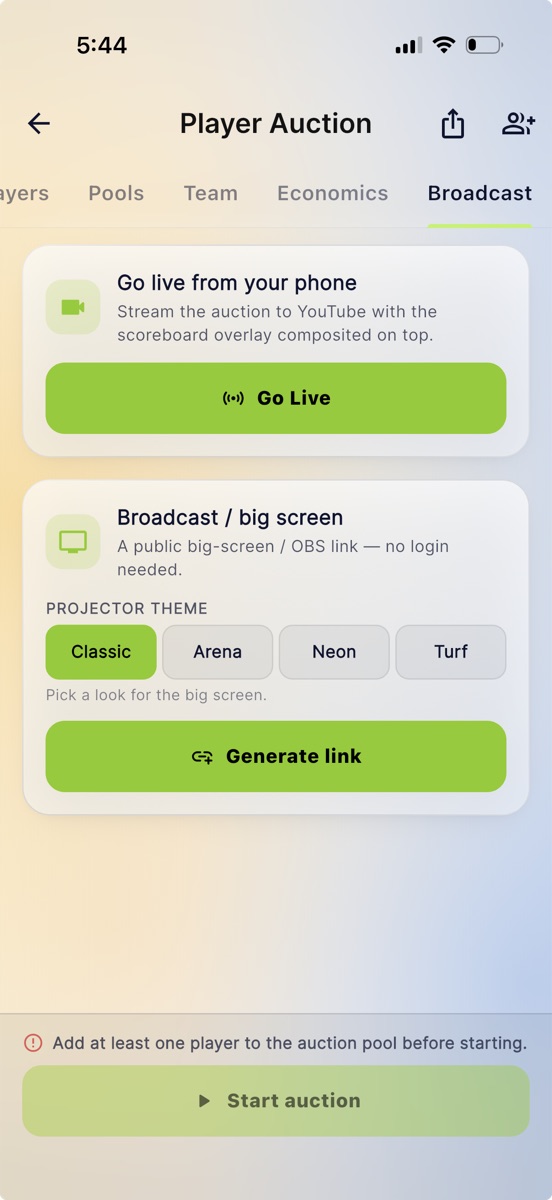
It lives on the Broadcast tab, and there are two ways in.
Broadcast / big screen. Pick a projector look, Classic, Arena, Neon, or Turf, and tap Generate link. That gives you a public link with no login needed, which you can open in a browser at the venue and throw on the wall, or drop straight into OBS or vMix as a browser source over your own camera feed.
Go live from your phone. Stream the auction itself to YouTube with the scoreboard overlay composited on top, the same way you would stream a match.
The Current Bid card shows the leading team's remaining purse and the last few bids, so viewers can follow the shape of a bidding war rather than just its result. Players whose cricket history was imported from another app still show their career numbers on the block card, scoped to the tournament's ball type, so a leather auction shows leather history and not a blank space.
What Players See
Players do not have to be in the room. Skipper pushes them the moments that concern them:
- "You're up!" when they go on the block, with their base price.
- "Sold!" with the team and the amount, which also goes to the winning team's owner, admin, and captain.
- "Unsold" if the hammer falls the other way.
Tapping any of them opens the auction room. Guests without a Skipper account are never pushed, and an undo is always silent, so nobody gets a false "Sold!" that has to be taken back.
After the Hammer
The results screen gives you every team's roster and total spend, the unsold list, and a summary with the number of players sold, the total spend, and the top buy of the night. You can group it by pool if you ran pools.
Two things to take away with you: a CSV export shared straight from the app, which is what you want for your own records and for the WhatsApp group, and a sold share card for the players who want to post that they went for a good price.
A Few Things Worth Deciding Early
- Squad minimums and per-pool minimums. Set them honestly. They are what the bid cap is calculated from, so a careless minimum makes for a strange auction.
- Retained captains. Sort these before you start, because starting closes registration for good.
- Bid timer length. Short timers make for a fast, tense evening. Long ones suit a room where captains are conferring. Remember it is a display clock, so it sets the mood rather than the deadline.
- Who represents each team. Only an owner, admin, or captain of an accepted team can bid, so sort that out before the night rather than during it.
Set it up in the afternoon, and by evening you have an auction that runs itself, keeps everyone honest about their purse, and looks good enough to put on a wall.