Your Child's Academy, on Your Phone
What time is practice? Did they attend on Saturday? Is the fee due? If your child trains at a cricket academy on Skipper, all of it is on one screen. Here is your way around.
Getting Connected
- The academy enrolls your child using your phone number. Skipper sends a code to that number, and you give it to the academy to confirm the number is yours.
- Install Skipper and sign in with that same number.
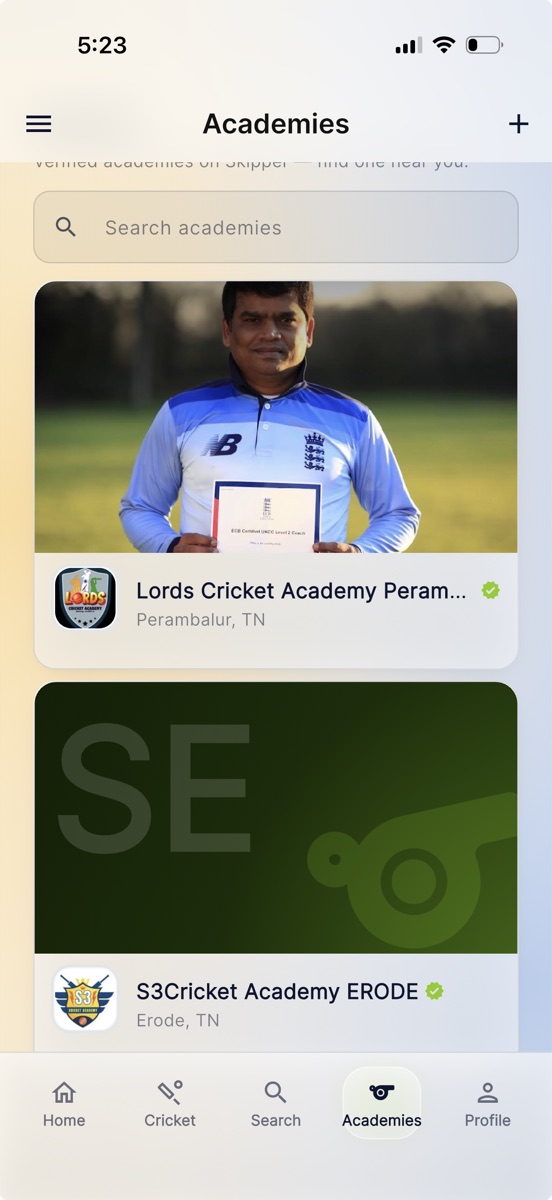
- Tap Academies in the bottom bar. Your child's academy is right there.
Looking for an Academy
If you have not picked one yet, Academies opens straight onto the directory. Search by name or browse what is near you, nearest first. The lime tick means Skipper has verified them.
Open any academy and you get its own page, which is worth reading before you call anyone. Depending on what the academy has put up, you will find:
- Programs: what they run, for which ages and levels, when the slots are, and what it costs.
- Facilities: nets, turf, bowling machine, whatever they have, usually with photographs.
- Coaches: who will actually be coaching your child, with their background.
- Achievements and a Gallery: what the academy has done and what the place looks like.
All of it is written by the academy itself. Skipper does not score academies, rate them, or count anything on their behalf, so what you are reading is their word rather than a number we invented.
Ready to talk to them? Tap Contact admin, add a line about what you are looking for if you like, and tap Send request. The academy sees your name and can start a conversation with you in the app. Your phone number stays private. You will see the button change to show your request was sent, so you are never left wondering whether it went through.
Your Home Screen
Open the academy and the things you actually check are at the top:
- Next session: the coming practice, with day, time, and ground.
- Attendance: how regular your child has been this month, as a simple percentage.
- Fees: a pill that says paid or due. Tap it to see the invoice.
Two kids at the same academy? A switcher at the top flips between them.
Below that is an ID card row: "View, share or scan at the gate". It opens your child's QR ID card, which you can share as a PDF.
The tabs along the bottom are Home, Fees, Notices, Progress and Store. Progress holds monthly reports, and Store appears when the academy sells kit.
Absent Messages
If your child is marked absent, the academy can tell you the same day. The app notification always comes. The academy may also send a WhatsApp message, and an SMS only when the WhatsApp could not be delivered.
Announcements
When the academy posts a notice, a washout, a timing change, tournament news, it lands on your phone as a notification and sits on your academy home screen. Tap All notices to read everything, with the important ones pinned on top. Nothing to forward, nothing to miss.
Fees and Receipts
- When a fee comes due, the invoice shows up in the app, and a reminder follows if it slips your mind.
- Open the invoice and tap Pay with the amount on it, like Pay ₹1,500. Pay by UPI has no platform fee. Card or netbanking may add a small one, and the screen shows it before you pay.
- Prefer to pay in cash at the ground? That still works. The academy records it and your invoice flips to paid.
- Either way, a proper receipt lands in the app to view or share.
Monthly Progress Reports
If the academy rates its students each month, the reports collect in the Progress tab. Pick your child if you have more than one, then pick a month.
- A report shows attendance for the month, the coach's ratings with the last few months beside them, match stats from Skipper scoring, and the coach's notes and signature.
- Tap Download PDF to keep a copy or share it.
- Tap Mark as read and the academy can see you have seen it.
You may also get the report as a WhatsApp link, which opens in your browser without the app. A sent report does not change. If the coach spots a mistake, the correction goes into next month's report. The full story, including what the coaches do on their side, is in Monthly Progress Reports for Your Academy.
Book a 1:1 Class
- If the academy offers private coaching, the sessions are on your home screen: which coach, how long, what it costs.
- Pick one, choose from the coach's free slots, and tap Book this slot.
- The slot is held for you, so nobody can take it. Pay at the academy.
Your bookings stay on the same screen, so you always know what is coming up.
Order From the Store
- Open the Store tab to see the academy's kit, balls, and merchandise.
- Pick a size, tap Place order.
- Collect and pay at the academy. The order's status updates in the app as it moves.
One Identity, the Whole Game
Here is the quiet superpower. Your child's academy profile is the same Skipper player profile they use in matches and tournaments. Weekend scores, batting and bowling stats, the full analysis, all of it builds on one identity. You watch a career take shape from your phone, one session and one match at a time.