How to Read and Share the Live Scorecard
While someone scores a match, everyone else watches the scorecard. It is the page a player's family opens from two states away, the page captains refresh between overs, the page that turns a local game into something you can follow ball by ball. This is a tour of that page, what each number means, and how to share it so other people can follow along too.
You do not score anything here. The scorecard updates itself as the match is scored, so all you do is read it.
The Bit That Never Moves: The Score Header
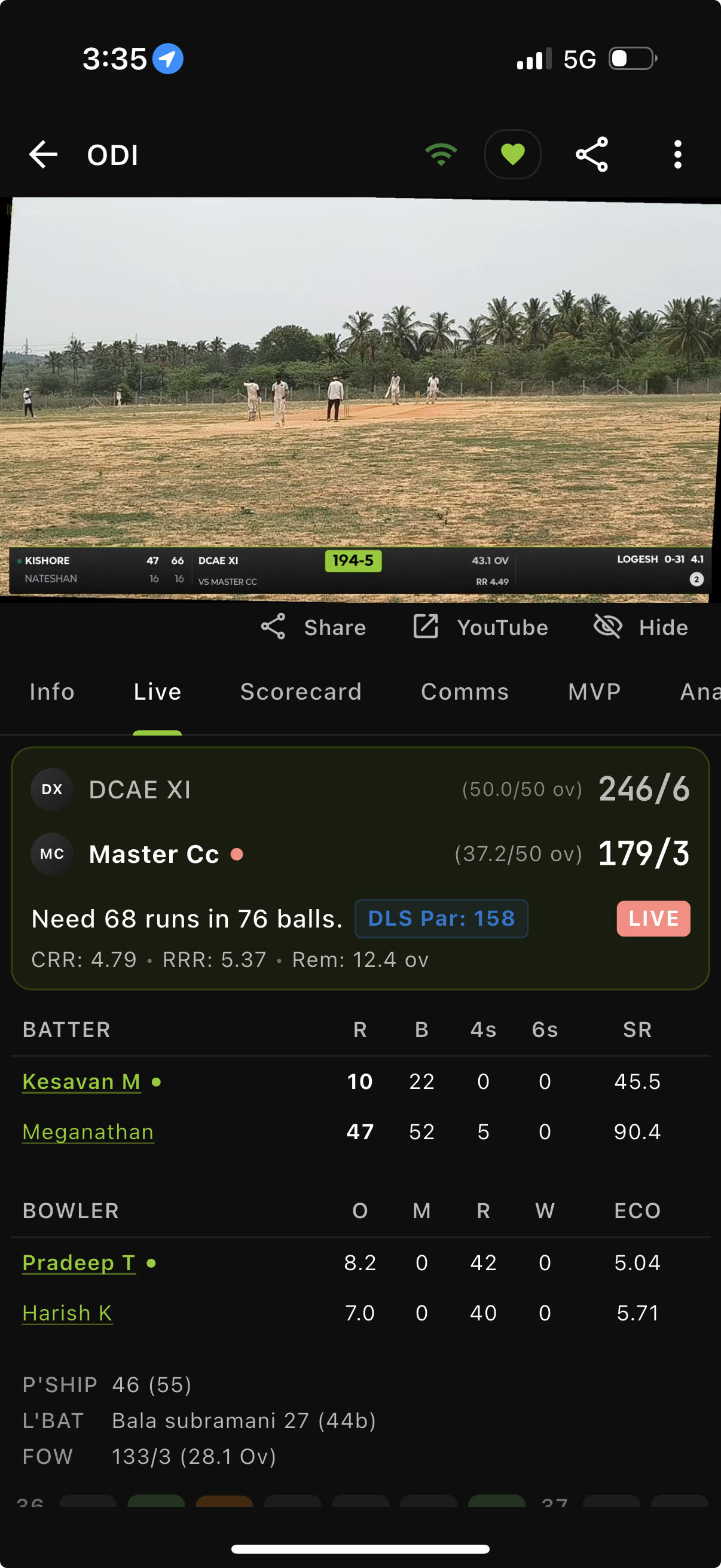
Pinned at the top, whatever tab you are on, is the score header. It carries the whole story of the match at a glance:
- Both team scores, with the side that batted first on top. Each shows runs and wickets (like 142/6) and overs bowled against the allotment (like 18.2/20 ov). A little red dot marks who is batting now.
- The chase line, during a second innings: "Need 18 runs in 22 balls." No mental arithmetic required.
- A status badge: LIVE in red while it is on, COMPLETED when it is done.
- The stats line: CRR (current run rate), RRR (the run rate the chasing side needs), and Rem (overs left).
Rain, and the DLS Par Score
If weather has shortened the game, a rain icon appears in the header. Tap it to see exactly what happened, when play stopped and how many overs were lost. During a rain-hit chase you will also see a DLS Par chip, for example "DLS Par: 145." That is the score the chasing team needs to be level under the rain rules. Ahead of par and they are winning, behind it and they are not. If you want the full story of how that number is worked out, our DLS explainer breaks it down.
The Tabs
Across the scorecard you will find a row of tabs. Which ones appear depends on the match, but here is what each is for.
Live
The pulse of the match. Current batters with their runs, balls, and strike rate (the asterisk marks who is on strike), the bowler's current figures, and a strip of pills showing every ball of the current over. A few lines of recent commentary sit underneath, and a tap takes you to the full feed.
Scorecard
The full detail, one innings at a time:
- Batting card: each batter, how they got out (like "c Fielder b Bowler 45"), with balls faced, fours, sixes, and strike rate.
- Bowling card: the familiar O-M-R-W, overs, maidens, runs, wickets, plus economy.
- Extras, broken down into wides, no-balls, byes, leg byes, and penalties.
- Fall of wickets and the partnerships that built the innings.
- Did not bat, for the players who never got the chance.
Comms
Ball-by-ball commentary, newest at the top. Tap any delivery to read the full line for it.
Preview and Report
Before the match this tab is called Preview, and once the result is in it becomes Report. It is a written look ahead, then a written account of the match. Our Match Reports guide has the detail.
Squads, Info, and more
Squads shows both playing elevens. Photos & Videos holds the pictures and clips from the match, and those who can edit the match can add their own. Info has the match details: format, overs, venue, and toss. For tournament matches you also get a Points Table tab. Once a match is live or done, an MVP tab ranks the standout performers and crowns the Player of the Match, and an Analysis tab digs into trends like the over-by-over run graph.
When the Match Is Over
The moment a match finishes, the Live tab becomes Summary and the header shows the result in plain words, "India won by 23 runs," "Match Tied," and so on. The Player of the Match is highlighted, and every tab stays available to read back through. The scorecard becomes a permanent record, not a live feed.
Following and Sharing a Match
This is how a scorecard travels.
Finding matches. Your home screen has a Live Matches row at the top and a Following section below it. Tap any card to open its scorecard.
Sharing. The share button in the top bar opens Share Match. Share Link hands you a match URL (it looks like app.skippercricket.com/match/...) that opens the same scorecard on a phone or in any browser. Share as Image creates a matchday graphic with the scores and logos, the kind of thing that does well in a group chat. Once a match is completed you can also pick Share as Video for a short reel and Scorecard PDF for a printable scorebook page. On a finished limited-overs match there are three more: Match report (image), Match report (PDF) and Match report card, which put the written report on one page or on a card sized for WhatsApp and Instagram. Which options you see depends on the match and your version of the app.
Following. Tap Follow on a match and it lands in your Following section, so you can jump back without hunting for the link. When you open a match from a shared link, Skipper follows it for you automatically (with an Undo if you would rather it did not).
On the web. The same links work at app.skippercricket.com. People who do not have the app can still follow along in a browser, with the identical scorecard.
Two Views of the Same Match
There is a subtle thing worth understanding. The scorer's phone shows the freshest possible scorecard, straight from the device doing the scoring. Everyone else sees the version on Skipper's servers, which is the same match a beat behind while updates upload.
You will almost never notice, but if the scorer is briefly offline you might see a small banner: "Uploading your latest updates." It means a few of the latest balls are still on their way to the server. Give it a moment and it catches up. The match is fine, the connection is just catching its breath.
Staying Live Without Lifting a Finger
The scorecard keeps a live connection open, so new balls arrive on their own. A small indicator shows whether you are online, and it reconnects by itself if your signal drops. You can pull to refresh if you like, but you do not need to. Leave the page open and the cricket comes to you.
Watching the Stream Too
If someone is streaming the match, a video card sits near the top of the scorecard. Tap it to watch the live broadcast right alongside the numbers. If nobody is streaming yet and you have access, the same spot invites you to roll the camera yourself. Our streaming guide covers that side of things.
Once you know where to look, the scorecard reads in a second. The header for the situation, the Live tab for what is happening right now, the Scorecard tab when you want the detail. Share the link, hit follow, and you can keep an eye on a match from anywhere.