Every Scoring Option in Skipper, Explained
The first time you open the scoring screen, it can look like a cockpit. By the end of your first over, it stops looking like one. Skipper is built so the common things are one tap away and the rare things are never more than two. This guide names every control and tells you what it actually does, so nothing on that screen is a mystery.
One thing to hold onto throughout: you never have to do cricket's mental arithmetic. Strike rotation, the over clock, who is on strike for a free hit, none of it is your job. You record what happened on the ball, and Skipper keeps the maths straight.
Recording Runs
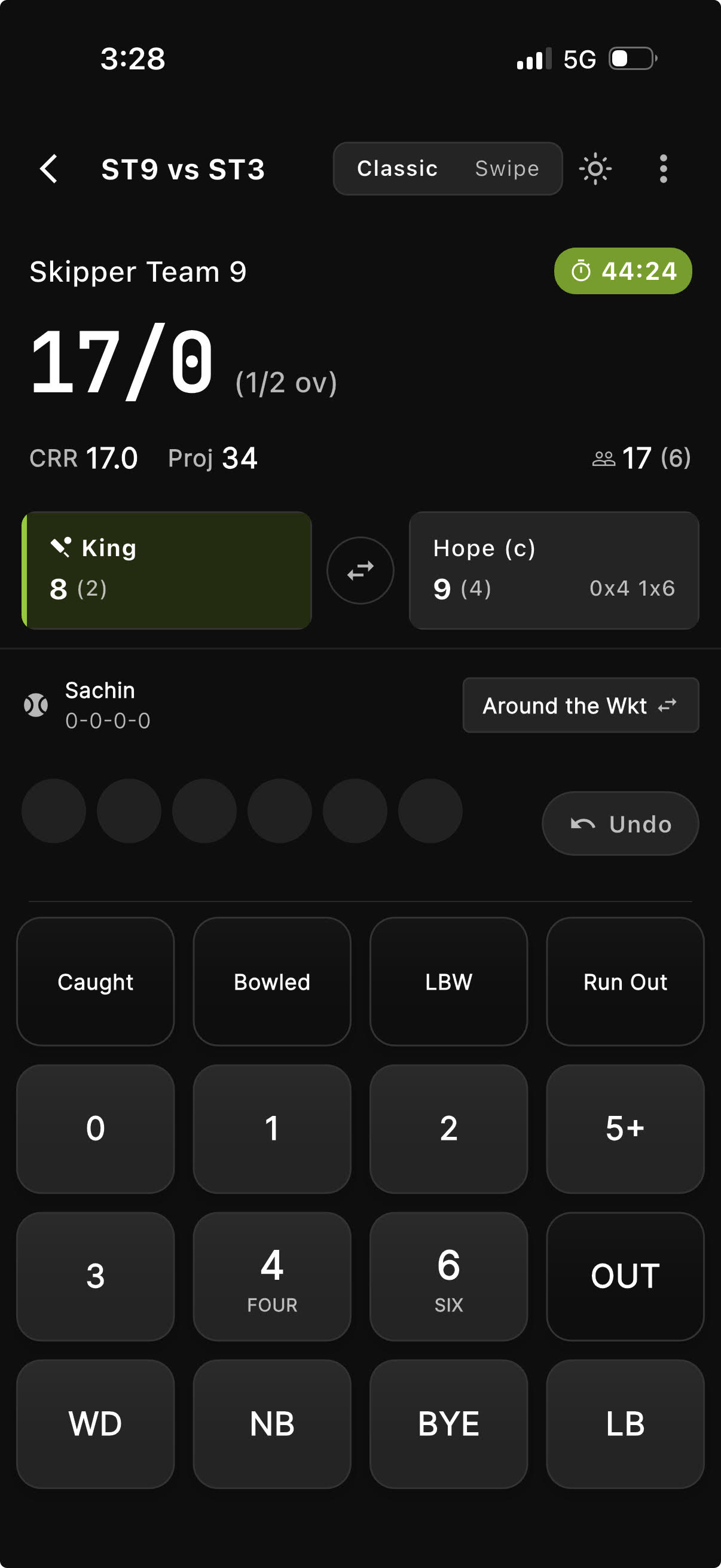
The big buttons are the run buttons. 0 (shown as DOT), 1, 2, 3, 4 (FOUR), and 6 (SIX). Tap what the batter scored off the bat and the ball is logged.
For the odd score that is not on a button, tap the 5+ option. It opens a small pad where you can pick 5, 7, 8, 9, or type any number up to 99. That same panel has an overthrows control (+1 to +4) for the runs that come from a fielding mistake after the shot.
Extras
Extras sit in their own row. Each one knows the law, so you only record the event and Skipper adds the runs correctly.
| Button | What it is | How Skipper handles it |
|---|---|---|
| WD (Wide) | Too far for the batter to reach. | Adds one run automatically, plus any extra runs the batters ran. The over does not advance, so a fresh legal ball is owed. |
| NB (No Ball) | An illegal delivery, usually a front-foot or height fault. | Adds one run automatically and brings up a free hit. You can also add runs off the bat, or byes and leg byes, on the same ball. |
| BYE | Runs taken when the ball misses bat and body entirely. | You enter how many were run (1 to 4). They count to the team, not the batter or the bowler. |
| LB (Leg Bye) | Runs taken after the ball hits the batter's body, not the bat. | Same as byes for scoring. The difference is only in how the run is recorded. |
A wide and a no-ball cannot happen on the same ball, so Skipper will not let you pick both. And when you record a no-ball, a small prompt asks whether the runs came off the bat, as a bye, or as a leg bye, so the credit goes to the right place.
The Free Hit
After a no-ball, the next delivery is a free hit, and Skipper marks it clearly on screen so you do not forget. On a free hit the batter cannot be out in the usual ways. Only a run out (or the rare obstruction or Mankad) counts. If that free-hit ball is itself a no-ball, you get another free hit. You do not have to track any of this. The screen tells you when a free hit is live.
Getting Out
Tap OUT and Skipper opens a grid of every dismissal in the game, with the common ones first and the rare ones below.
| Dismissal | What it means | Worth knowing |
|---|---|---|
| Bowled | The ball hits the stumps. | Credited to the bowler. |
| Caught | A fielder catches it on the full. | Pick the fielder who took the catch. |
| Caught Behind | Caught by the wicketkeeper. | The keeper is the fielder. |
| Caught & Bowled | The bowler catches their own ball. | Bowler gets both credits. |
| Run Out | Stumps broken while the batters are running. | Batters may have completed runs first, so Skipper lets you record those. |
| LBW | Leg before wicket. | Credited to the bowler. |
| Stumped | The keeper breaks the stumps with the batter out of the crease. | Pick the keeper. |
| Hit Wicket | The batter knocks their own stumps. | Runs already run can be recorded. |
| Mankad | The non-striker is run out backing up before the ball is bowled. | Recorded but does not use up a legal ball. |
| Hit Ball Twice, Obstructing the Field, Timed Out, Absent | The rare ones. | All there when you need them, tucked out of the way when you do not. |
For catches, stumpings, and run outs, Skipper asks who was involved so the fielding stats are right. For the others it just records the wicket.
Retiring a Batter
A batter does not always leave because they are out. To retire someone, tap their name at the top of the screen and choose:
- Retired Not Out. The batter is leaving for an injury or some other reason and may come back later. This does not count as a wicket.
- Retired Out. The batter is done for the innings and will not return. This does count as a wicket.
It is a small distinction with a big effect on the scorecard, which is why Skipper makes you choose deliberately rather than guessing.
Made a Mistake? Undo
Everyone mis-taps. The Undo button removes the last ball and rolls everything back, including reopening the batter or bowler picker if that ball had ended an over or taken a wicket. If you need to fix something further back, the scorecard has a bulk edit for past deliveries and completed overs. Undo greys out for a moment while a ball is saving, which is deliberate, it stops two taps from fighting each other.
Scoring by Tapping the Field
If you prefer, you can score by tapping a picture of the ground instead of the buttons. Tap where the ball went and Skipper suggests the runs, tap the boundary for a four or six, and the same run, extra, and wicket controls appear to confirm. As a bonus, this is what builds the wagon wheel you will see later in the analysis.
The Optional Extras: Delivery Detail
Some match types let you tag each ball with more detail: the shot played, the line and length, and the type of delivery. This is entirely optional and feeds the heat maps and analysis. Box-cricket and casual formats turn it off so scoring stays quick.
Settings You Chose Before the First Ball
A few choices on the match setup screen quietly shape how scoring behaves once you are live:
- Overs per innings decides when the innings ends on time.
- Players per team and wickets per innings decide when the innings ends on wickets.
- Last Man Standing, if you switch it on, lets the final batter carry on alone instead of ending the innings.
- Powerplay overs are tracked for the record.
- Special Rules on the match setup Format screen lets you set Wide runs (0 to 10, default 1), No ball runs (0 to 10, default 1), Wide counts as a ball (off by default), and No ball counts as a ball (off by default).
Get these right at setup and the innings closes itself at exactly the right moment.
We made this for tape ball and gully leagues that play a wide as two runs or count a wide as one of the six balls. Leave it alone and nothing changes. Rules lock once the match starts so a scorecard cannot change afterwards. The same settings exist for a whole tournament under Scoring rules in the tournament settings, and every match in the tournament follows them.
The Short Version
Tap the runs off the bat. Use the extras row for anything that was not a clean delivery. Hit OUT for a wicket and tell Skipper who was involved. Tap a batter's name to retire them. And keep Undo in mind for the inevitable slip. Do that and the scorecard, the strike, the over count, and every stat take care of themselves.