
Scoring Enrichments: Turn Every Ball into Insight
Runs and wickets tell you what happened. Enrichments tell you how. With a tap or two more per ball, Skipper can record where the ball pitched, the shot the batter played, the kind of delivery it was, and where it went. String a season of that together and a player can see, in pictures, exactly where they score their runs and where they keep getting stuck.
You decide how much of this to collect, from nothing at all to every detail on every ball. Here is what each one is, and how to set it up so scoring stays as quick as you want it.
The Four Things You Can Capture
| Field | What it records | What it tells a player |
|---|---|---|
| Pitch Map | Where the ball pitched, on a line-and-length grid. | A bowler's accuracy, and a batter's strong and weak lengths. |
| Shot Type | The shot the batter played (drive, cut, pull, defend, and so on). | Which shots bring runs, and which bring trouble. |
| Ball Type | The kind of delivery (a yorker, a bouncer, a googly, a slower ball). | Which deliveries beat a batter, and how varied a bowler is. |
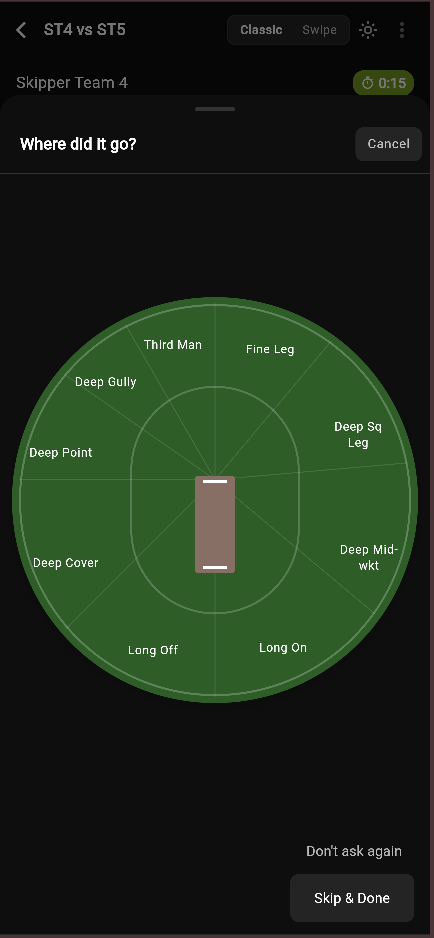
| Field Zone | The direction the ball was hit, around the wagon wheel. | A batter's scoring areas and their blind spots. |
Entering one is a single tap on a picture. Field Zone, for instance, asks "where did it go?" and you tap the part of the ground the ball travelled to.
Off, Optional, or Required
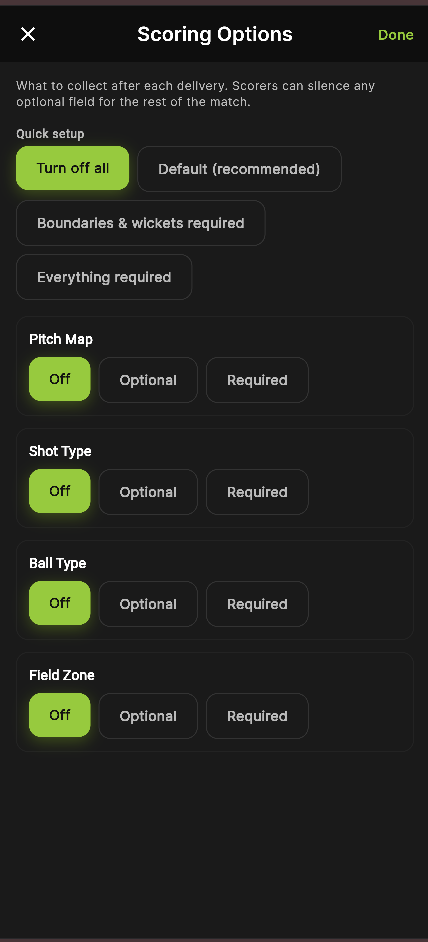
Each of the four can be set three ways. This is the dial between rich data and fast scoring:
- Off: never asked. The quickest way to score.
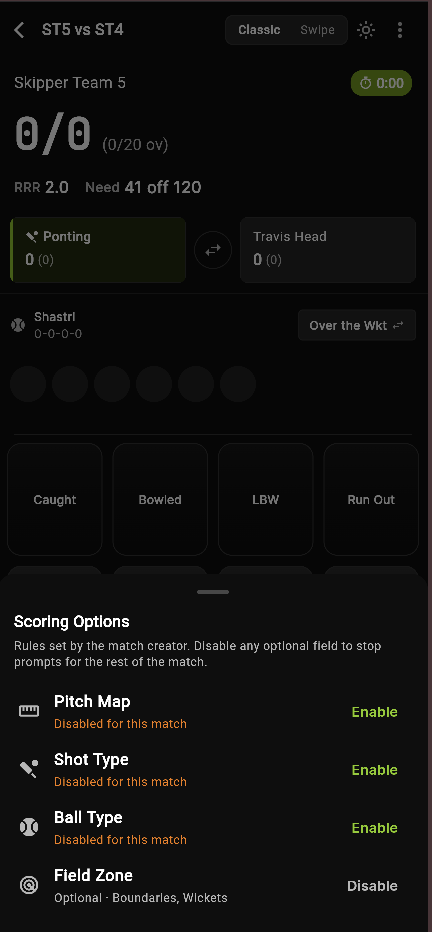
- Optional: the scorer is prompted but can skip, and can even silence the field for the rest of the match if it is slowing them down.
- Required: the scorer has to enter it before moving to the next ball. Use this when the data really matters, like a coaching session or a serious league.
When to Collect It
Capturing something on every single ball is a lot of tapping. So each field lets you choose which moments trigger the prompt: dots, singles, twos, threes, boundaries, wickets, wides, no-balls, byes and leg byes.
The recommended default keeps it light by collecting on boundaries and wickets, the balls that matter most. That alone gives you a useful pitch map and wagon wheel without slowing the over down. Add more moments when you want a fuller picture.
Quick Setup
You do not have to set each field by hand. Four presets get you most of the way there:
- Turn off all, for the fastest possible scoring.
- Default (recommended), the balanced setting described above.
- Boundaries and wickets required, to guarantee the key moments are always captured.
- Everything required, for full analysis when you have the time and the taps.
Setting It Up When You Create a Match
You choose all of this during match setup. On the Match Format step, open Scoring Options, pick a preset or set each field yourself, and you are done. The rules travel with the match, so every scorer on it follows the same setup.
A note for organisers: today these rules are set per match, not once for an entire tournament. So when you create the matches in a tournament, choose the same Scoring Options on each one to keep the data consistent across the event.
Changing Your Mind Mid-Match
Set something to optional and find it is too much on the day? The scorer can open Scoring Options from the in-match menu and silence any optional field for the rest of the match, then turn it back on later. The match creator sets the rules; the scorer keeps a release valve for when the cricket is coming thick and fast.
The Payoff: Where It Shows Up
Here is the reason to bother with any of it. Everything you capture flows into the Analysis tab, both on the match and on each player's own profile:
- the Wagon Wheel, from Field Zone, showing where a batter scores.
- the Pitch Map, showing where a bowler lands it and where a batter is troubled.
- Shot Analysis, from Shot Type, like "drives: seven boundaries, twelve dots, one wicket."
- Ball Type breakdowns, like "yorkers: half a run a ball, one wicket."
A batter who can see that two thirds of their runs go square on the leg side, or a bowler who can see every wicket came from a fuller length, has something concrete to work on at the next net. That is the whole point of the extra taps.
Start with the recommended default. It costs almost nothing while scoring and still leaves a player a wagon wheel and a pitch map worth studying. Turn the dials up when the match, and the players, deserve the full picture.