
Find Anything with Search
You played a friend last month and want to pull up the scorecard. A captain mentions a club you have never heard of. Someone asks which ground that final was at. All of it used to mean digging through tabs. Now it is one box.
Where It Lives
Tap the search icon on the home screen. Start typing. Two letters is enough to get going.
One Box, Everything In It
Search looks across all of Skipper at once:
- Players, by name and the team they turn out for.
- Teams, by name.
- Matches, by the sides playing and the ground.
- Tournaments, by name.
- Grounds, by name and city.
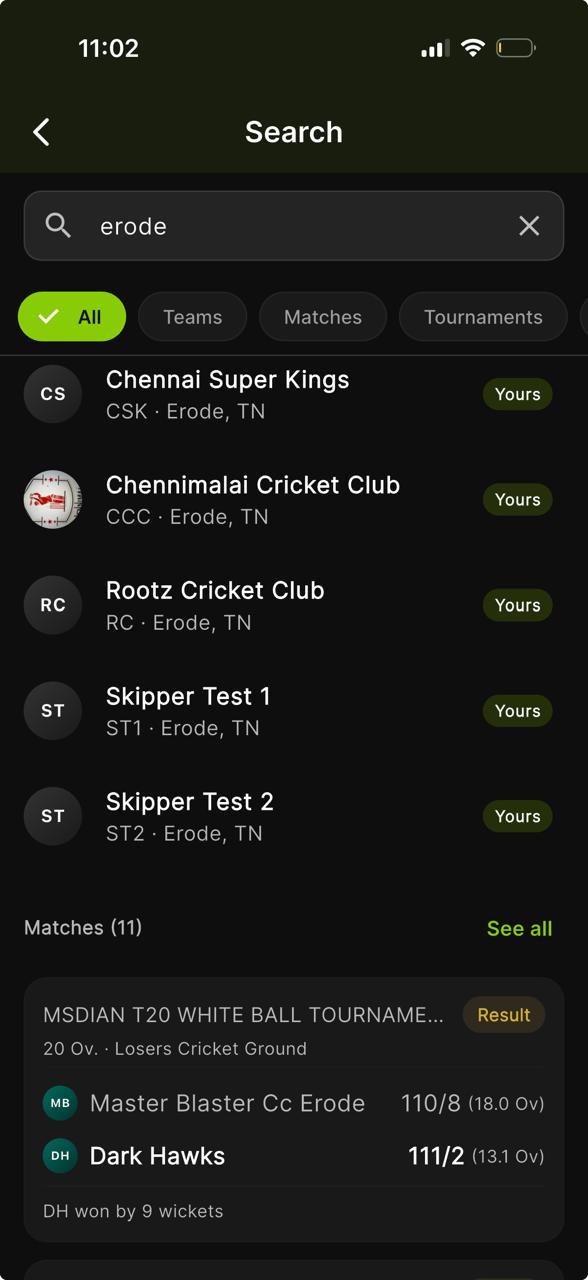
Results come back grouped by kind. Matches show as proper match cards, score, status and date. Tournaments show as tournament cards. Players, teams and grounds come back as neat tiles with a photo and a line of detail, so you can tell two people of the same name apart at a glance.
Narrowing It Down
Above the results sits a row of pills, All, Players, Teams, Matches, Tournaments, Grounds. Tap one to show only that kind. If a group has more than fits on screen, a See all link beside its heading opens the full list. Tap any result to go straight to that profile, match or page.
It Knows Your Cricket
Search leans on the cricket you actually follow. The teammates you play with, the teams you belong to, the tournaments you are in, those tend to surface first. So when you type a common name, the person you meant is usually sitting right at the top rather than buried three screens down.
A Few Things It Is Good For
- Pulling up last week's match to send the scorecard to the group.
- Checking a player before you add them to a team.
- Finding a tournament a friend is playing in to follow it live.
- Looking up a ground you are headed to for the weekend.