
Light, Dark, and App Themes
Cricket is not always played in the same light. A Sunday league game starts in glare you can barely read a phone in, and a tournament night game ends under floodlights with everyone squinting at a bright screen. So Skipper now comes in both light and dark, with a cleaner, glassy look running through the whole app, and you switch between them whenever it suits the conditions.
Where to Change It
Open Settings and tap App Theme. You will find two sets of backdrops, one for dark and one for light, and the one you are using is ticked. Pick another and the app changes under you straight away, so you can see it before you commit.
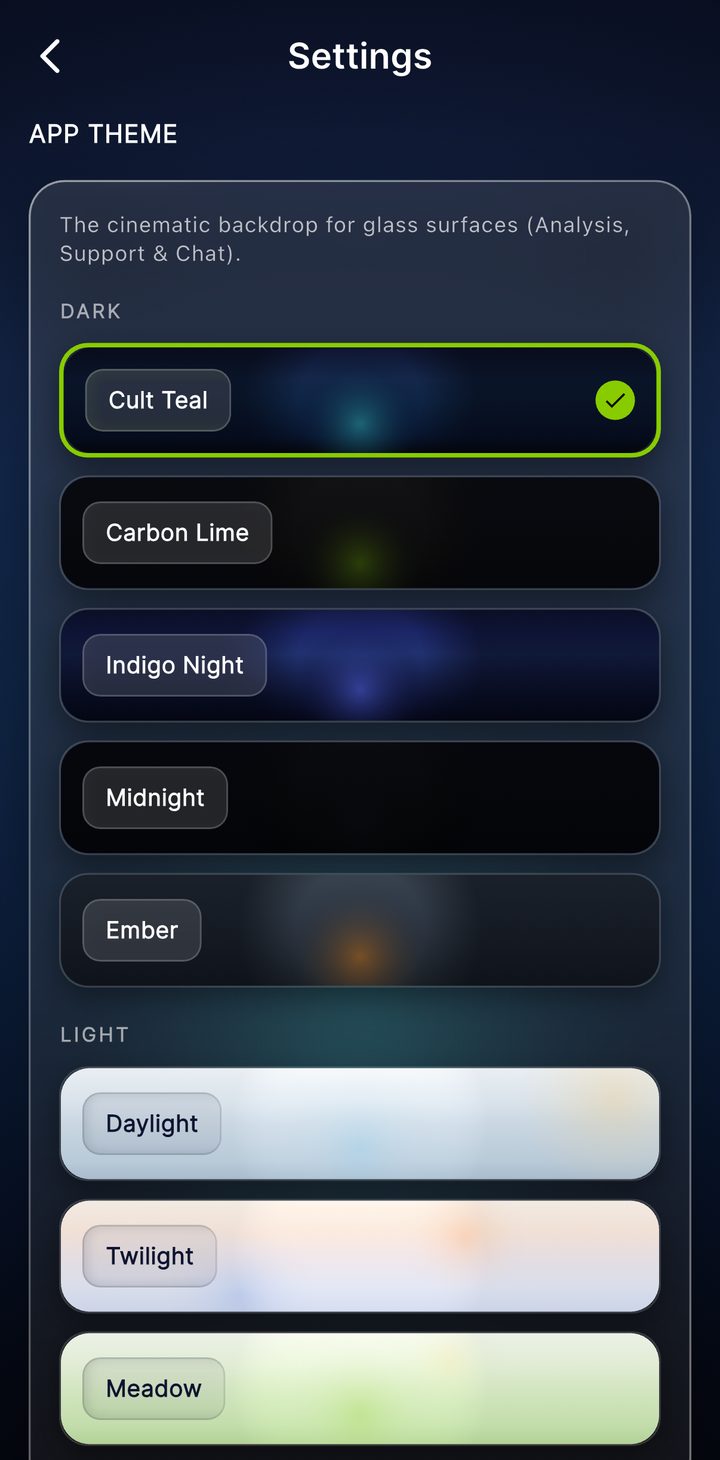
A Backdrop, Not Just a Switch
It is more than a plain light-or-dark toggle. Each side has a few named looks, a softly coloured backdrop that the app's frosted glass sits over and catches the light from. On the dark side there are deeper, cinematic tones. On the light side there are calmer, brighter ones for daytime. They are all readable, so this is about the feel you want, not about giving anything up.
Which to Use, and When
- Light earns its keep in the sun. Scoring at a midday game, a brighter screen is easier to read at arm's length on the boundary.
- Dark suits the night game and the late finish, and it is easier on the eyes and the battery in low light.
Your choice is yours alone. It lives on your device and does not change what anyone else sees, so set it to whatever you like looking at and forget about it. Conditions change, the app keeps up, and the cricket underneath stays exactly the same.